
Marketers – 7 Easy Steps to Secure your WordPress Site Against Brute Force Attacks

Summary: See the real time evidence of a hacking attack on one of our websites and the steps we took – along with their impact they had. Full details included so you can take the same steps to secure your WordPress site against brute force attacks
Cyber security gets real when you’ve been hacked
If you own, develop, or rely on a WordPress website, you might be surprised to learn there’s a good chance it is already being targeted by hackers.
“What, our little site? No one would be interested.”
Wrong.
“Surely not – there’s nothing worth hacking?”
Wrong.
Here’s the bottom line – automated hacking attempts are persistent and often target smaller sites because they tend to be easier to get into.
Once in, they probably don’t want your site or data, they will use it to insert malicious content (redirecting visitors to spam sites), spread malware, or host phishing pages, amongst other things.
You can read more about ‘why’ in this article on WP Security Ninja: Why are even small websites attacked by Hackers
If you still don’t believe me, have a look at what’s been happening to a small site we look after. I’m not going to name it, but it’s for a sole trader, and while tiny in the scheme of things, it matters a lot to them. Losing access or having it hacked would be unbelievably disruptive to their business (and potentially very costly to sort out).
In the rest of the article, we’ll detail steps you can use to secure your WordPress site against brute force attacks like this.
Here’s a log of attempted break-ins on the site:
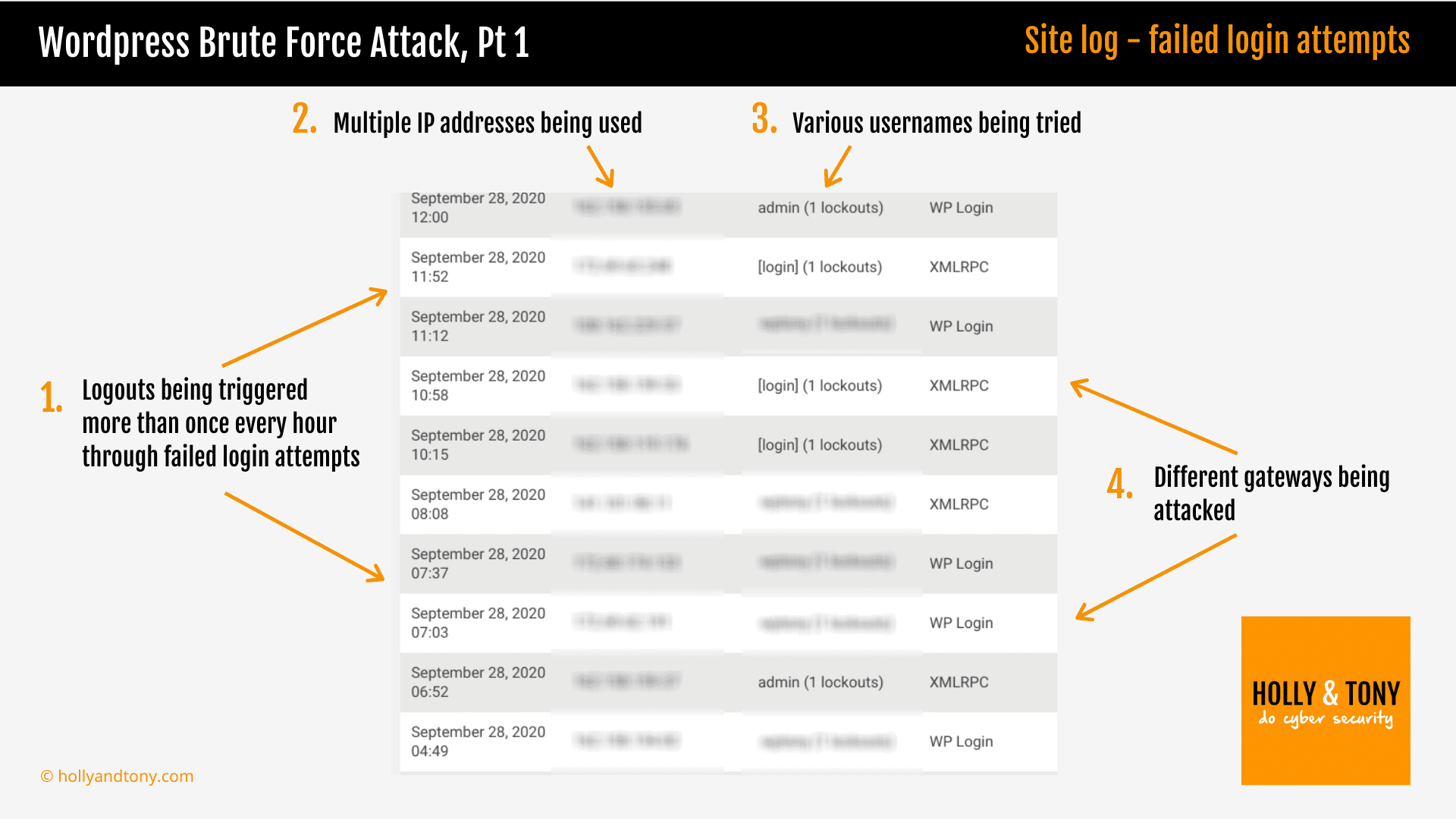
You can see that, despite using a plugin that locks anyone out who repeatedly fails to login correctly, it is under sustained attack from a roster of IP addresses.
Even with the lockout protection (in default mode at this stage), this amounts to dozens of attempts in a single day to crack the password. And unchecked, this may carry on day after day. This is called a ‘brute force’ attack and there’s a good chance it’s happening on your WordPress site right now.
So what did I do?
1) Set a strong (long) password
I already had a strong password but taking no chances, I changed it for another, new one. We’ll write more about passwords but, in short, length of password is key. As is uniqueness. Either use a password manager or 3 random words with at least 15 characters.
2) Delete ‘Admin’ username
Every WordPress site, out of the box, comes with an admin account using ‘Admin’ as the username. When left unchanged, every hacker therefore already knows the account name and that means they just need to guess the password.
So you should always create a new admin account with a different name and then delete the ‘Admin’ username. I do this with every site and this site therefore already had no ‘Admin’ username.
However, what might be scary to note – it unsettled me – was that they were using my correct user name for this site. Unfortunately, this is something that can be worked out fairly easily and the hackers had done so. I’ll come back to this later because fixing it wasn’t the immediate priority. Instead, I added…
3) Add 2 Factor Authentication
Two-factor authentication is another big and meaty layer of security. It means that even if the hacker has my username and cracks my password, they will need a one time 6 digit password that is only available on my smartphone.
There are many free plugins you can use to add this, here’s one I’ve tried and there’s another option at the end of the article. It takes a minute or so to set up, add a tiny extra step to your login process, but makes it much, much harder for a third party (automated or not) to gain access to the site:
Go to WP 2FA plugin

4) Limit login attempts
I already had a login limiter on the site – it’s how I was notified of the brute force hacking attempt. As explained, it locks out any IP addresses repeatedly failing to login (because they have entered the wrong username and/or password).
This is the one I’ve been using:
Go to Limit Login Attempts Reloaded plugin

On seeing the logs of the attempted hacking attempts, I increased the sensitivity of the failed login lockout. IPs responsible for failed attempts were therefore locked out much more quickly and for much longer.
Immediate impact: not much – there’s still an unrelenting series of login attempts getting picked up.
Ok, over time the longer lockout might reduce this. The hackers might even get fed up and move onto an easier target – this does happen – but for now, they are still testing the strength of my password on a regular basis. To be frank, that’s annoying and a little intimidating (despite knowing I have a very strong password and 2FA in place).
So I have escalated my response with a fifth step – changing the login url….
5) Change the login url
All WordPress sites come out of the box with a default url where you log into the site yoursite.com/wp-admin
This is a problem because every hacker knows this, so they know exactly where to go to start trying to break into the site.
But it’s easy to change and that’s what I did next. I used the plugin WPS Hide Login to change the login page.
Go to WPS Hide Login plugin

[Note – some experts suggest this is an unnecessary step for security as it just obfuscates rather than boosts protection. You can see that here it is one part of a series of steps, most of which strengthen protection, and I just prefer to minimise the number of hacking attempts too and sleep easier that way.]
This time the rate of attempted logins dropped off considerably more. But not completely. How come? Take a look at the screenshot:
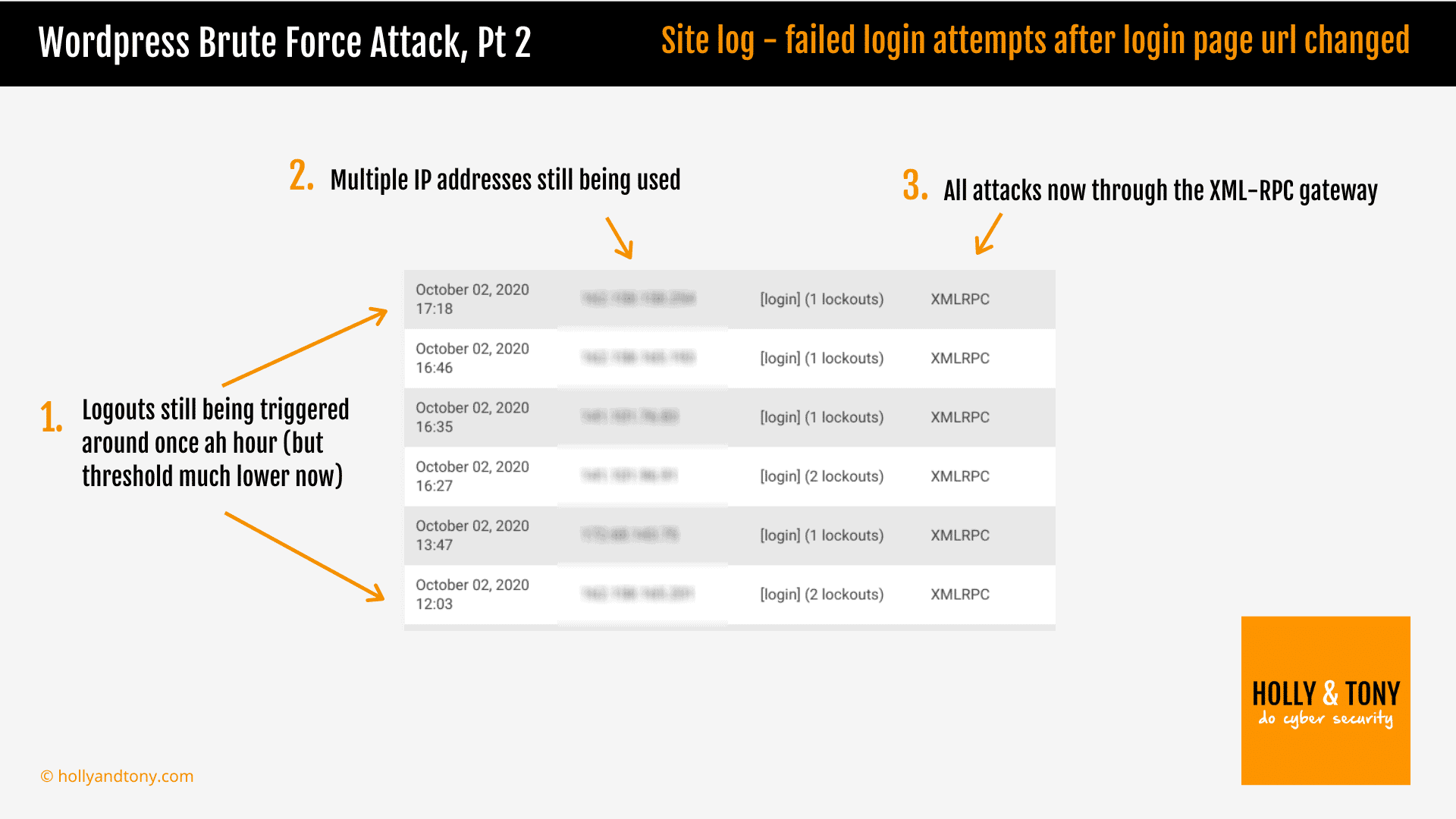
The login attempts still being picked up are using the XMLRPC gateway, rather than the WP login page. In other words, they are using a different route and a different potential vulnerability. So then came step 6…
6) Disable XML-RMC
In a nutshell, XML-RPC refers to some largely redundant functionality for wordpress and in most cases it can be turned off. Read more here on the Hostinger website: What Is Xmlrpc.php in WordPress and Why You Should Disable It
So my next step was to disable XMLRPC on the site. I chose to use a plugin but there are other methods (as detailed in the article linked above).
Here’s what happened next: no obvious change.
Hmmmm. I don’t know if the plugin didn’t work, or maybe it had secured the vulnerability but not stopped the attacks showing and being logged. But I wasn’t completely comfortable – I wanted to stop them completely.
So I did some more investigation and decided to try another security plugin called Wordfence.
Go to Wordfence plugin

I have used Wordfence before on other sites. It is highly regarded and free (there is a premium version too). However, it is also quite overwhelming with so many features and options that I never felt entirely comfortable with it. I prefer individual plugins that deliver the specific tasks I want to achieve.
But I gave it another go and when I checked 24 hours later, no more XMLRPC attacks had been recorded.
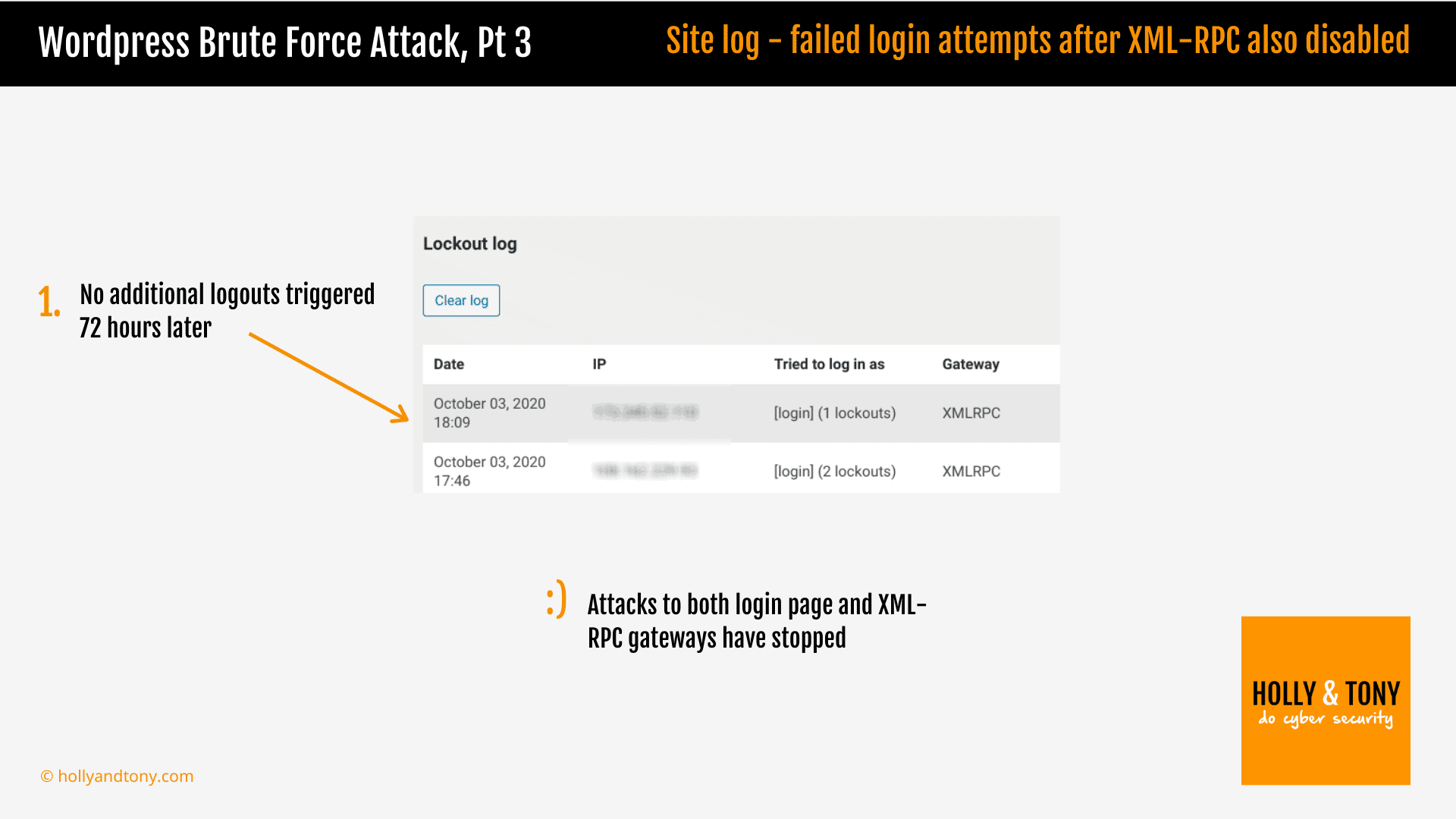
BINGO!!!
That’s what I wanted. So adding this step removed the last of the logged brute force attacks.
However, Wordfence also offered something else. Earlier I mentioned that hackers can see user accounts on WordPress site, and Wordfence has a setting to stop it too. So that’s step 7 to ensure another loose end is tied up…
7) Hide account usernames
You can add some code to prevent hackers seeing the account usernames, but if you are running Wordfence it’s as simple as checking a couple of boxes and it’s all taken care of.
In fact, to give it full credit, Wordfence can handle almost all the steps I have taken on its own. It does a lot more besides to help secure the site but that can feel confusing and complicated.
I’m going to dig deeper into Wordfence and will report back later.
So is this WordPress site now secure?
No – there are other potential vulnerabilities not least of which is failing to update WordPress software and plugins and removing any unused plugins. And if enough resources were targeted on the site, I have no doubt it could be breached.
But the simple steps above will, as the screenshots show, go a long way to protecting your site from automated brute force attacks.
Recap – 7 steps to secure your WordPress site from brute force attacks
For now, let’s recap the 7 steps we have taken both to stop the brute force attacks on this site and strengthen its defences against them.
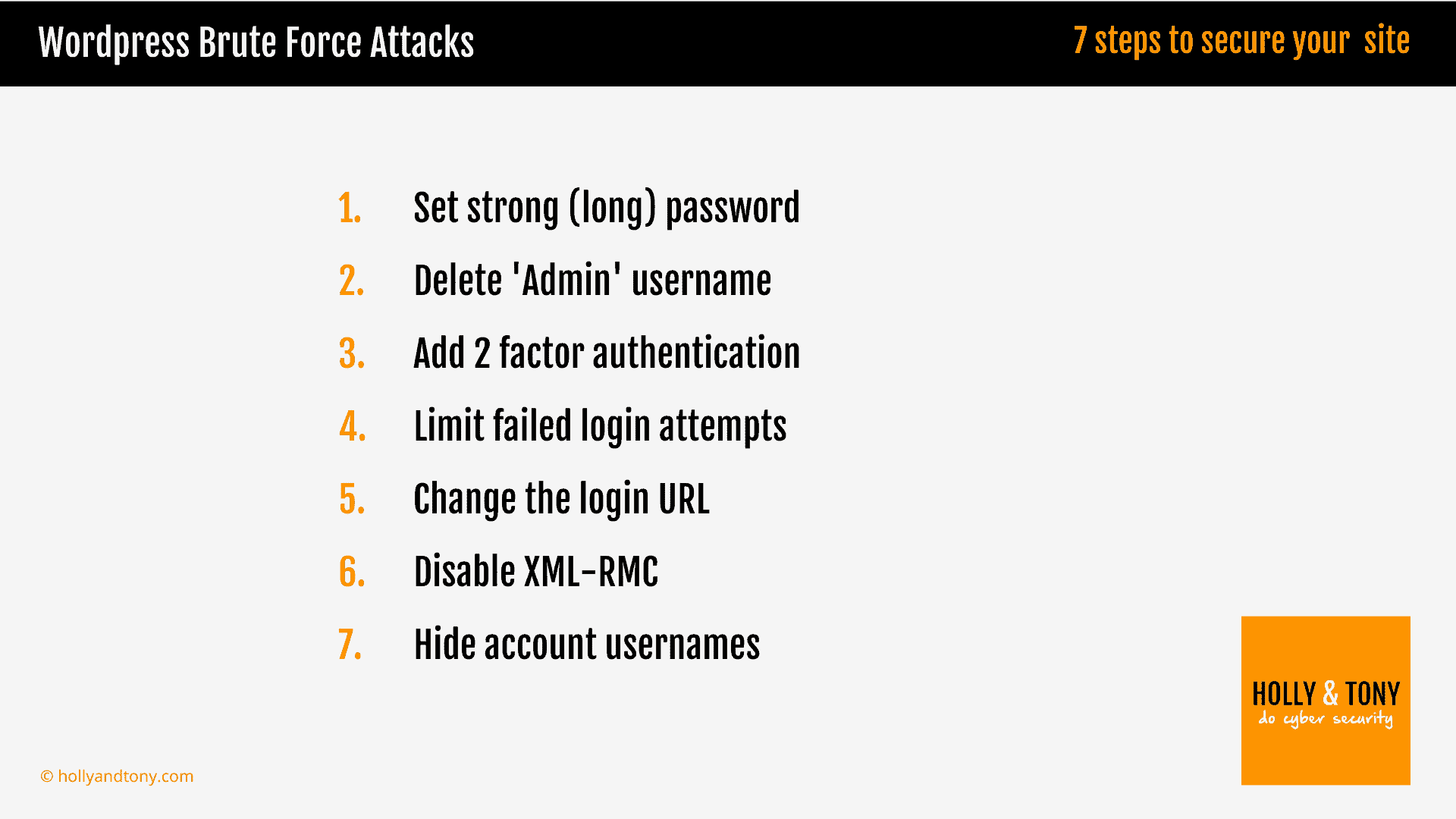
And with these steps in place, several days on, the brute force attacks appear to have stopped. More importantly, we know the site is much better equipped to withstand them should they start again.